

Tool Interface Preview
Random Email Generator
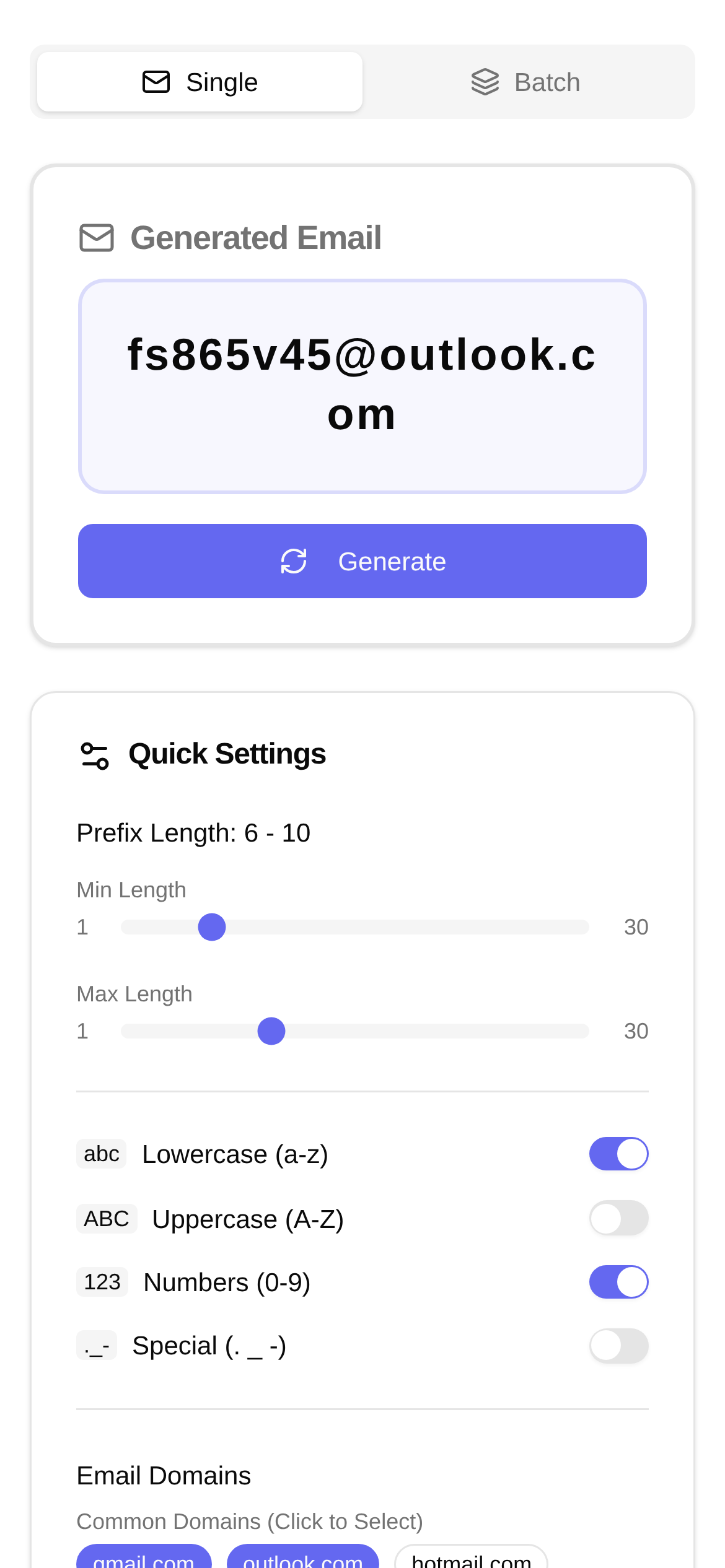
Having navigated the internet for so long, I've found that an email address is essentially a universal pass. Whether you want early access to new features, register a burner account to try something out, or join an online event, you need one. But constantly using your real email address comes with plenty of headaches: spam floods your inbox, and personal privacy becomes a constant worry. If you try to manually create a bunch of temporary emails, the slow process will drive you crazy. Isn't there a more effortless way?
Today, I want to highly recommend an amazing tool—the Random Email Generator. With it, you can say goodbye to annoying spam and privacy leaks, while your work efficiency skyrockets.
What does this tool actually do? Why do I need it?
Have you ever experienced these frustrating moments:
- QA Testers: You want to test user registration and email sending features, but you need tons of different emails. Typing them out manually one by one makes your hands numb.
- Developers: During the development phase, you need to simulate various user identities and quickly generate emails to verify features. Time is money!
- Everyday Users: When registering for rarely used websites or those that look like they'll spam you with promos, you really don't want to hand over your primary email.
- Marketers: Running A/B tests or market research requires bulk account registration, which is a massive workload.
Normally, registering emails is not only slow but also easily turns your primary inbox into a "spam recycling bin." The Random Email Generator, as the name suggests, helps you instantly and rapidly churn out a batch of unique email addresses. What makes it powerful is that it allows you to customize the email prefix and suffix, making the generated emails more personalized or tailored to your specific needs. For example, you can generate a sequence like testuser_1@example.com, testuser_2@example.com, which is absolutely perfect for bulk operations.
Who needs this Random Email Generator the most?
Honestly, this tool is especially suited for people who need a large volume of emails, worry about privacy, or want to boost testing efficiency. For instance, if you are a Software QA Engineer doing stress testing or functional regression testing, you might need to simulate hundreds or thousands of user registrations. Creating emails manually? That's a pipe dream! But with the Random Email Generator, you can get all the emails you need in seconds, making your testing efficiency soar.
For Developers, during the development and debugging phases, you often need to simulate different user states and permissions. Bulk generating emails with specific prefixes helps you better manage and categorize test data, making your workflow much smoother.
Even for everyday internet users, when registering on sites you might only use once or don't fully trust, using random email addresses is a great way to protect your real email and avoid spam harassment. So, "how do you use the Random Email Generator?" Don't worry, let's walk through it in practice.
Say Goodbye to the Hassle, Get It Done in One Click!
Next, I'll use the Random Email Generator tool to demonstrate how to easily bulk generate random email addresses. This website (https://www.toolkk.com/tools/random-email-generator) is incredibly simple to use yet powerful, making it your ideal choice.
- Open the tool page: First, open your browser and visit the official page of the Random Email Generator.
- Set the generation quantity: On the page, you'll see a "Quantity" option. Depending on your actual needs, enter how many email addresses you want to generate, such as "10", "100", or even more.
- Customize the prefix (Optional): If you want the generated email addresses to have a uniform starting string, for example, to distinguish different test batches, you can fill it in the "Prefix" box. For instance, if you enter
mytest_, the generated emails will follow the formatmytest_xxxx@domain.com. - Customize the suffix (Optional): By default, the tool provides some common email suffixes (like
@example.com). But if you have special requirements and want to set a non-existent domain suffix for testing, you can enter it here. When comparing the "Random Email Generator" with other tools, this is quite a practical advanced feature. - Click generate: Once all settings are configured, click the "Generate" button. In the blink of an eye, a long list of brand-new, randomly generated email addresses will appear before you.
- Copy, paste, and use: You can directly copy these generated email addresses and paste them into your test scripts, registration forms, or anywhere else you need them. Keep in mind that these email addresses are usually "fake emails," meaning they won't actually receive emails, but they are perfectly fine for passing registration validation or acting as placeholders.
The whole process takes less than a minute. The efficiency is off the charts!
FAQ: The "Little Details" You Might Want to Know
- Are these emails real? Most email addresses created by random email generators are "virtual," meaning they don't have an actual inbox function. Therefore, they cannot be used to receive verification codes or emails. Their primary use is for registration and testing scenarios where receiving actual emails isn't required. If you need to receive emails, you might want to consider using a disposable email service.
- Can I customize the domain? Some advanced tools support custom domains. The Random Email Generator I recommended earlier has a custom suffix feature, which is quite flexible to use.
- Will these emails conflict? The tool typically generates sufficiently random strings, so theoretically, every generated email address is unique, minimizing the chance of duplicates.
- "Who is the Random Email Generator actually for?" As I mentioned earlier, it is particularly suitable for developers, QA engineers who need massive amounts of test data, and everyday users who want to protect their privacy.
After reading today's introduction, I believe you now have a comprehensive understanding of the random email generator and know how to use the Random Email Generator to bulk generate email addresses. Say goodbye to registration hassles starting right now!
Disclaimer: The tool introduced here is primarily intended for testing and registration scenarios. The generated email addresses usually cannot actually receive emails. Please do not use such tools for illegal purposes, such as sending spam or conducting online fraud. Always comply with relevant laws, regulations, and platform policies.