

Tool Interface Preview
Caesar Cipher Encryption and Decryption
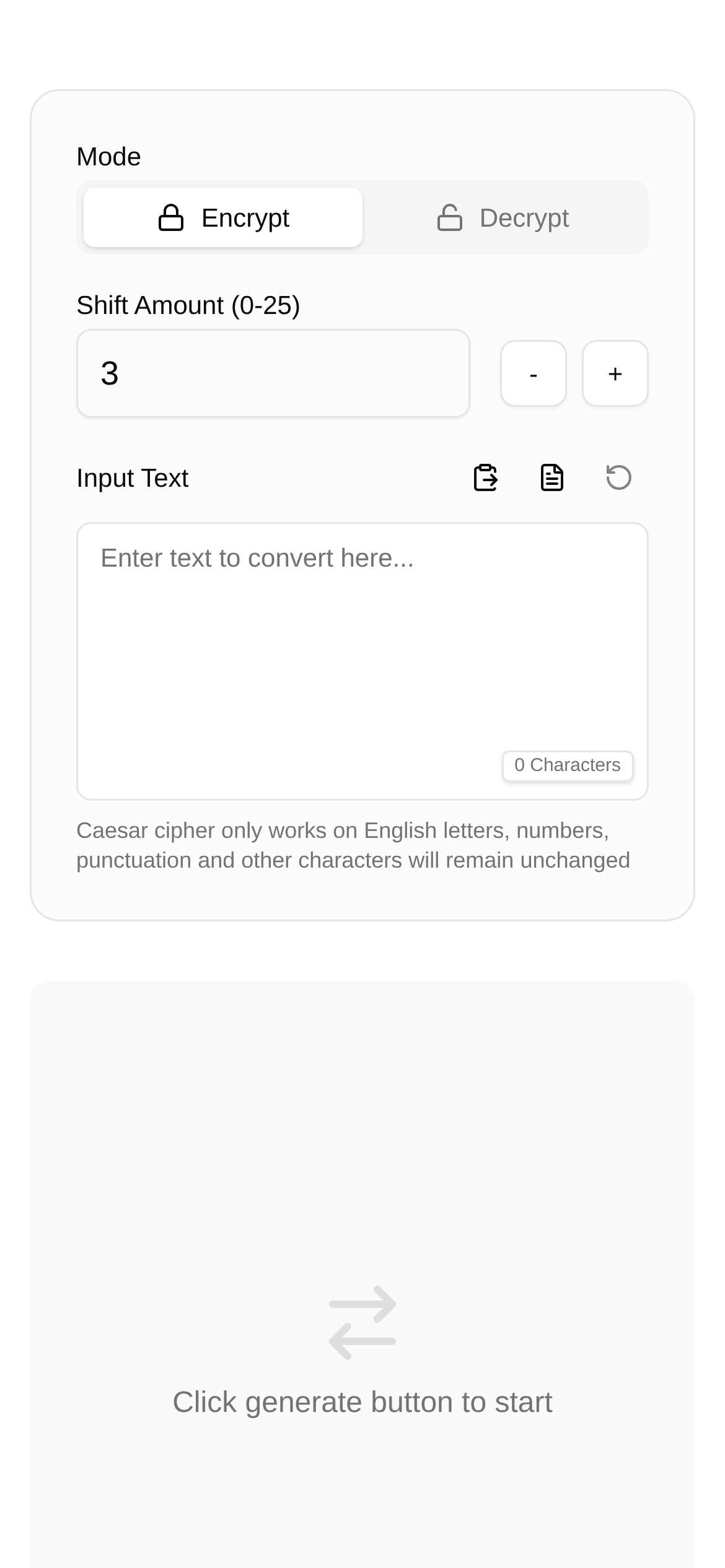
Have you ever wondered how Julius Caesar encrypted his letters to ensure military intelligence remained secure? Or what secrets are hidden in those cryptic messages you see in detective novels? One of the answers lies in an ancient and classic encryption method—the Caesar Cipher. Today, we will dive into the details of the Caesar cipher and walk you through using an online tool to easily encrypt and decrypt messages.
The Caesar Cipher: A Clever "Shift" Encryption Trick
The Caesar cipher is also known as a shift cipher. Simply put, it is a type of substitution cipher. Its core concept is very simple: each letter in the plaintext is shifted forward (or backward) by a fixed number of positions down the alphabet, and replaced by the shifted letter. This "fixed number of positions" is what we call the "key" or "shift value".
For example, if the key is 3, 'A' becomes 'D', 'B' becomes 'E', and so on. When you reach the end of the alphabet, it wraps around to the beginning. Because this method is simple and straightforward, it allows for quick encryption and decryption even without high-tech equipment, making it incredibly practical during ancient warfare.
The Caesar Cipher: Not Just for History Books
Although the Caesar cipher seems a bit weak compared to today's complex encryption technologies, it hasn't completely faded into history. It is still quite useful in certain scenarios:
- A stepping stone for cryptography beginners: For anyone looking to learn cryptography, the Caesar cipher is absolutely the best starting point to understand encryption principles. Through it, you can intuitively grasp basic concepts like substitution, keys, plaintext, and ciphertext.
- Adding flavor to games and puzzles: For treasure hunts, trivia, or children's cipher games, the Caesar cipher is a simple yet fun encryption method that makes games more engaging and challenging.
- Quickly obfuscating non-sensitive information: Sometimes, you might need to quickly "blur" less important information so it isn't immediately readable. The Caesar cipher is very handy for this.
- A great tool for teaching demonstrations: In computer science or information security classes, teachers love using the Caesar cipher to demonstrate how encryption algorithms work.
Caesar Cipher Operation Guide: Step-by-Step Encryption and Decryption
While you can encrypt and decrypt the Caesar cipher by hand, using an online tool is definitely faster and more accurate. I recommend trying the Caesar Cipher Encryption/Decryption tool. It is easy to use, supports custom alphabets and shift values, and is an excellent aid for learning and practicing the Caesar cipher.
1. Encryption Process:
- Access the tool: Open the Caesar Cipher Encryption/Decryption link.
- Enter plaintext: Type the original text you want to encrypt into the "Input Text" box. For example: "HELLO WORLD".
- Select encrypt: Click on the "Encrypt" option.
- Set the shift value: Choose a shift value (the key), typically an integer between 1 and 25. Let's use "3".
- Execute: Click the "Execute" button, and you will see the encrypted ciphertext below: "KHOOR ZRUOG".
2. Decryption Process:
- Access the tool again: Return to the Caesar Cipher Encryption/Decryption page.
- Enter ciphertext: Type the received ciphertext into the "Input Text" box. For example: "KHOOR ZRUOG".
- Select decrypt: This time, choose "Decrypt".
- Set the shift value: Enter the exact same shift value used during encryption. In this case, "3".
- Execute: Click the "Execute" button, and the decrypted plaintext will appear below: "HELLO WORLD".
3. Custom Alphabets and "Brute Force" Tips:
The great thing about this tool is that it supports custom alphabets, which is especially useful for handling uncommon characters or performing specialized encryption tasks.
Additionally, if you don't know the shift value, you can try a "brute force" attack—which means trying every possible shift value one by one. In this tool, you simply keep changing the shift value and decrypting until you see readable plaintext. This is the most intuitive demonstration of brute-forcing a Caesar cipher.
Caesar Cipher FAQs: A Beginner's Guide!
-
Is the Caesar cipher secure? No, it is not secure at all. The key space is too small, with only 25 possible keys. A hacker can easily crack it by trying all possibilities, so don't rely on it to protect important information.
-
What is the difference between a Caesar cipher and a shift cipher? They are essentially the same thing. The Caesar cipher is a specific type of shift cipher, named after the Roman Emperor Julius Caesar because he was the first to use it on a large scale.
-
How should I choose a shift value? For the Caesar cipher, you can pick any integer between 1 and 25. Since the cipher itself is inherently insecure, the specific shift value you choose doesn't significantly impact its security. In practice, you can just pick one at random.
-
Who is this tool for? What should I keep in mind? The Caesar Cipher Encryption/Decryption tool is perfect for cryptography beginners, history buffs interested in historical ciphers, and anyone needing simple encryption for teaching or games. Compared to complex encryption tools, its biggest advantage is being simple, intuitive, and easy to use. Just remember, never use it to encrypt highly sensitive information.
-
Why does the decrypted text sometimes look like gibberish? If the decrypted text is still unreadable, the most common reason is an incorrect shift value. Make sure the shift value you enter is exactly the same as the one used for encryption. If you really don't know the shift value, try a brute force attack (testing all possible shift values).
In summary, the Caesar cipher is like an entry ticket to the world of cryptography. With its simple principles and operations, it opens a small window into the realm of information security. With the Caesar Cipher Encryption/Decryption online tool, you can easily experience and understand this ancient encryption technique, laying the foundation for exploring more complex cryptographic knowledge in the future.