

Tool Interface Preview
Inverse Trigonometry Calculator
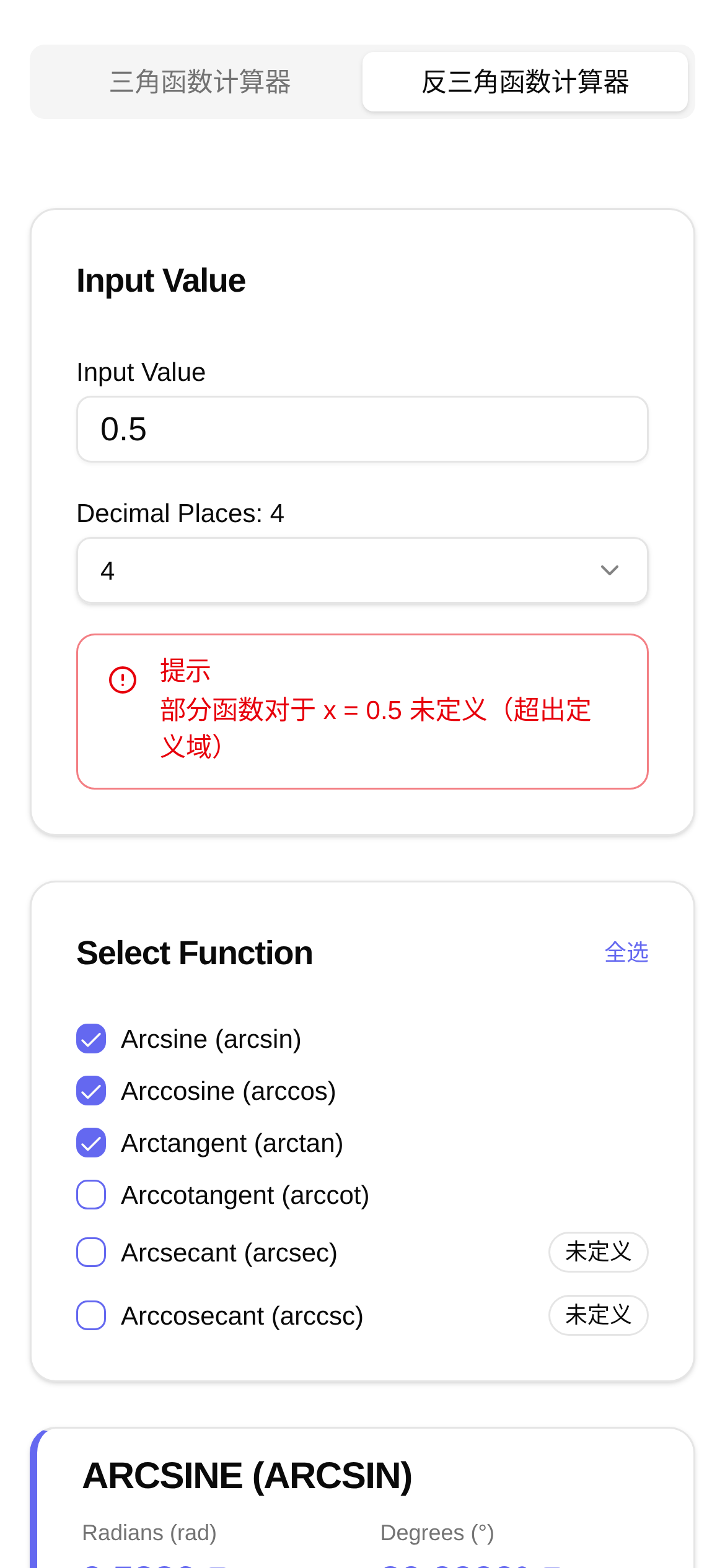
In the fields of mathematics and engineering, inverse trigonometric functions like arcsine (asin), arccosine (acos), and arctangent (atan) are incredibly common. They act as the "translators" of trigonometry, helping us find the corresponding angle based on a known trigonometric value. Whether you're calculating the angle of an incline, designing mechanical parts, or handling rotational transformations in computer graphics, chances are you'll need to work with them.
Honestly, calculating these inverse trigonometric functions manually is both time-consuming and error-prone, especially when you need highly precise results. Looking up values in tables is inefficient, and even using a scientific calculator can be cumbersome, let alone processing them in bulk. That's why having a convenient and easy-to-use online inverse trigonometry calculator is a lifesaver.
Meet Your Dedicated Inverse Trigonometry Solver
Today, I want to share a hidden gem I recently discovered—the Inverse Trigonometry Calculator. It is specifically designed to calculate the radian values of inverse trigonometric functions quickly and accurately. Not only does it support the most commonly used arcsine (asin), arccosine (acos), and arctangent (atan), but it also covers arccotangent (acot), arcsecant (asec), and arccosecant (acsc). Whether you're a student studying math or an engineer performing professional calculations, it meets all your needs.
What impresses me most about this tool is its powerful functionality and flexible settings:
- Comprehensive: It covers almost all common inverse trigonometric functions, including
asin(x),acos(x),atan(x),acot(x),asec(x), andacsc(x). - Highly Accurate: You can define the precision of the results yourself, ensuring you get the exact high-accuracy data needed for research or design projects.
- Easy to Use: The interface is exceptionally clean. Even if you're a beginner, you can figure out how to use it instantly without spending time on complex tutorials.
- Accessible Anywhere: No downloads or installations required. Just open your browser and start using it. It's incredibly convenient to pull up and calculate wherever you are.
Who Needs This Inverse Trigonometry Calculator?
This inverse trigonometry calculator has a wide range of applications. Students, teachers, and professionals across various industries can all benefit from it.
- Students: When studying trigonometry and inverse trigonometric functions, you can use it to verify results and deepen your understanding. For example, if you want to quickly confirm whether the radian of
asin(0.5)isπ/6during a problem-solving session, just type it in. - Teachers: It serves as a great teaching assistant. Demonstrating the calculation process of inverse trigonometric functions in class becomes much more efficient.
- Engineers: Professionals in mechanical design, electronic circuits, and signal processing often need to calculate angles precisely. This tool can significantly boost work efficiency. For instance, if you need to calculate the rotation angle of a part, simply input its trigonometric value, and the radian appears instantly.
- Researchers: During data analysis and model building, there is a huge demand for high-precision calculations of inverse trigonometric functions. With this tool, it's a breeze.
How to Use the Inverse Trigonometry Calculator: A Step-by-Step Guide
Using this inverse trigonometry calculator couldn't be simpler. Just follow these quick steps:
- Open the Webpage: Enter
https://www.toolkk.com/tools/anti-trigonometric-calculatorin your browser to go directly to the calculator page. - Select the Function: Find the inverse trigonometric function you want to calculate on the page, such as
asinoracos, and click to select it. - Enter the Value: Type your known trigonometric value into the corresponding input box. For example, if you want to calculate
arcsin(0.5), enter0.5in the box next toasin. - Adjust Precision (Optional): If you have specific accuracy requirements for the result, you can select the precision setting or manually input your desired number of decimal places.
- View the Result: Click "Calculate" or "Solve" (the button text might vary slightly), and the calculator will instantly display the corresponding radian value.
Tips: What to Keep in Mind When Using the Inverse Trigonometry Calculator
Q1: Why is my result different from what I expected?
A1: First, check if your input value falls within the valid domain of the inverse trigonometric function. For example, the x value for asin(x) and acos(x) must be between [-1, 1]. If it exceeds this range, the calculator might throw an error or display NaN (Not a Number). Also, make sure you've selected the correct function type.
Q2: Can this calculator output degrees directly?
A2: Currently, this inverse trigonometry calculator provides radian values by default. If you need degrees, you'll have to convert it manually (the formula is: Degrees = Radians * 180 / π). Future versions may consider adding a degree conversion feature.
Q3: What makes it better than a traditional scientific calculator?
A3: Compared to traditional scientific calculators, the biggest advantage of this online tool is that it's convenient, intuitive, and specifically optimized for inverse trigonometric calculations. You don't need to carry a physical calculator around; as long as you have internet access, you can use it anywhere. The interface is cleaner, making the operation process clear at a glance. It is especially suitable for scenarios requiring fast batch calculations or specific precision requirements. Plus, it eliminates the complex key combinations of traditional calculators, significantly lowering the learning curve.
Q4: Can I set the precision myself?
A4: Absolutely! This tool supports custom precision settings. You can adjust the number of decimal places according to your needs, making the results either more precise or more concise.
Q5: Who is this inverse trigonometry calculator for?
A5: As mentioned earlier, it's suitable for anyone who needs to calculate inverse trigonometric functions—from middle school and college students to math enthusiasts, engineers, and researchers. If you frequently need to solve for radian values or want a handier tool than a traditional calculator, this is definitely a great choice.
In short, this inverse trigonometry calculator is powerful and easy to use. It can save you a lot of hassle with inverse trigonometric calculations and significantly boost your learning and working efficiency. Give it a try!