

Tool Interface Preview
Chinese to Pinyin Converter
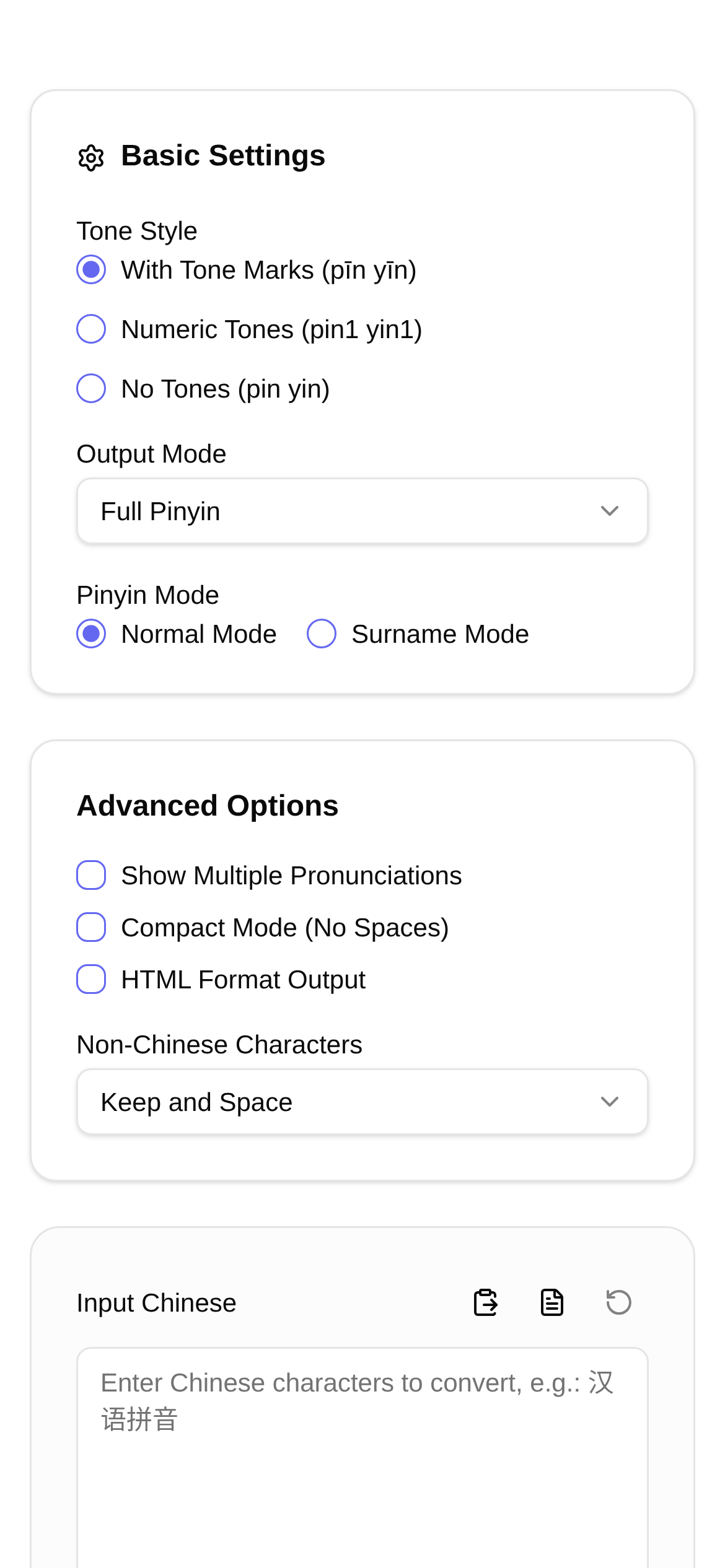
Hello everyone, I'm Little K, and I love tinkering with practical tools. Today, I want to talk about a topic that might seem niche but is actually incredibly useful—converting Chinese characters to Pinyin. Have you ever scratched your head over an unfamiliar character? Or gotten dizzy from all the different tone marks while learning Mandarin? Or maybe you're a teacher or editor who needs to add accurate Pinyin annotations to text? Don't worry! Today, I'll walk you through exactly how to turn Chinese characters into Pinyin, and I highly recommend a fantastic online tool I've been using: the Chinese to Pinyin Converter.
What Makes This Tool Great? Never Worry About Pinyin Again!
Honestly, the need to convert Chinese characters to Pinyin comes up quite often in daily life. Looking up words in a dictionary used to be painfully slow. Nowadays, there are plenty of online converters, but when it comes to polyphone recognition (characters with multiple pronunciations) and tone marking, many of them seem to lose their minds.
The Chinese to Pinyin Converter I'm recommending today perfectly solves these persistent problems! Not only does it convert Chinese characters into Pinyin with standard tone marks (like ā, á, ǎ, à), but it can also output numbered tones (a1, a2, a3, a4) or a toneless version. What surprised me the most is its smart polyphone recognition feature, which determines the correct pronunciation based on context, significantly boosting accuracy. As a great detail, it even offers a Name Mode that handles the special pronunciations found in Chinese names flawlessly—an absolute lifesaver for anyone dealing with name translations.
Who Needs This Feature? The Use Cases Are Endless!
This Chinese to Pinyin tool is perfect for a wide range of users:
- Language Learners: Whether you're a beginner or an advanced student, you can use it to master Chinese pronunciation and tones, rapidly improving your Mandarin.
- Teachers: Preparing lessons, creating teaching materials, and annotating new vocabulary becomes significantly more efficient.
- Editors and Writers: Easily add Pinyin annotations to rare characters or words where you want to emphasize pronunciation.
- Programmers and Developers: When processing Chinese text, you often need to convert characters to Pinyin for sorting, searching, or indexing.
- Foreigners: For non-native speakers unfamiliar with Chinese characters, this tool helps quickly grasp Chinese pronunciation—a true learning asset.
- Parents: Tutoring kids with homework, teaching them characters, and checking Pinyin accuracy is now much less stressful.
So, as long as you have even the slightest need for Chinese Pinyin, this tool will become your right-hand assistant. It doesn't just tell you "how to use a Chinese to Pinyin converter"; it provides a complete solution.
Step-by-Step Guide: Generate Pinyin in Just a Few Clicks!
Using the Chinese to Pinyin Converter couldn't be easier. Let me walk you through the steps:
- Open the Webpage: Type
https://www.toolkk.com/tools/pinyin-chinese-converterdirectly into your browser to access the tool's homepage. - Enter Your Text: You'll see a large text box on the page. Just paste or type the Chinese characters you want to convert. A single character, a word, a sentence, or even a large paragraph—it handles it all.
- Select a Mode: This depends on your needs. For example, if you want Pinyin with tone marks, select "With Tones"; if you prefer numbered tones, choose "Numbered Tones". If you're processing names, don't forget to check "Name Mode".
- Click "Convert": Once everything is set, go ahead and click the "Convert" button at the bottom of the page. The tool will instantly turn your Chinese text into Pinyin.
- Copy the Results: The converted Pinyin will appear in the text box below. Just copy it and you're good to go—super convenient.
The whole process is incredibly smooth, and even first-time users will get the hang of it immediately. If you were wondering "how to use a Chinese to Pinyin converter," these steps should make it crystal clear.
FAQ: Troubleshooting & Pro Tips!
You might have a few questions when using the Chinese to Pinyin Converter. I've summarized a few common ones here to help you out:
-
Q1: Is the polyphone recognition actually accurate? A1: This tool was designed with a strong focus on polyphone recognition. It smartly determines the pronunciation based on the context you provide. However, if it encounters highly obscure phrases or lacks sufficient context, it might default to the most common pronunciation. If you notice an incorrect polyphone, try converting that specific word separately or providing more context.
-
Q2: What should I do if the tone marks show up as gibberish? A2: First, check your selected output mode. If you're using the "With Tones" mode, ensure your device and browser support Unicode tone symbols. If the text is still garbled, try switching to the "Numbered Tones" mode.
-
Q3: Who is this tool really for? A3: As mentioned earlier, anyone who needs Chinese Pinyin—from everyday users to professionals—can benefit from it. People in online education, publishing, and Chinese language learning will find it especially useful. Still wondering "which Chinese to Pinyin tool is the best?" Give this one a try.
-
Q4: Are there other tools I can compare this with? A4: There are certainly other Chinese to Pinyin converters on the market, but many fall short when it comes to polyphone recognition and tone marking. This tool's advantage lies in its smart recognition algorithm and versatile output modes, which cater to more detailed requirements.
-
Q5: Is there anything I should keep in mind while using it? A5: Remember to protect your privacy and avoid entering highly sensitive information into the tool. Although the tool itself does not save your input, it's always good practice to maintain safe browsing habits.
Through this introduction, I believe you now have a comprehensive understanding of Chinese to Pinyin conversion, including how it works, what it can do, and how to use this Chinese to Pinyin Converter. I hope this tool genuinely helps you, making your Pinyin processing more efficient and accurate, and taking some of the stress out of your work and studies!