

Tool Interface Preview
Chinese to Pinyin Converter
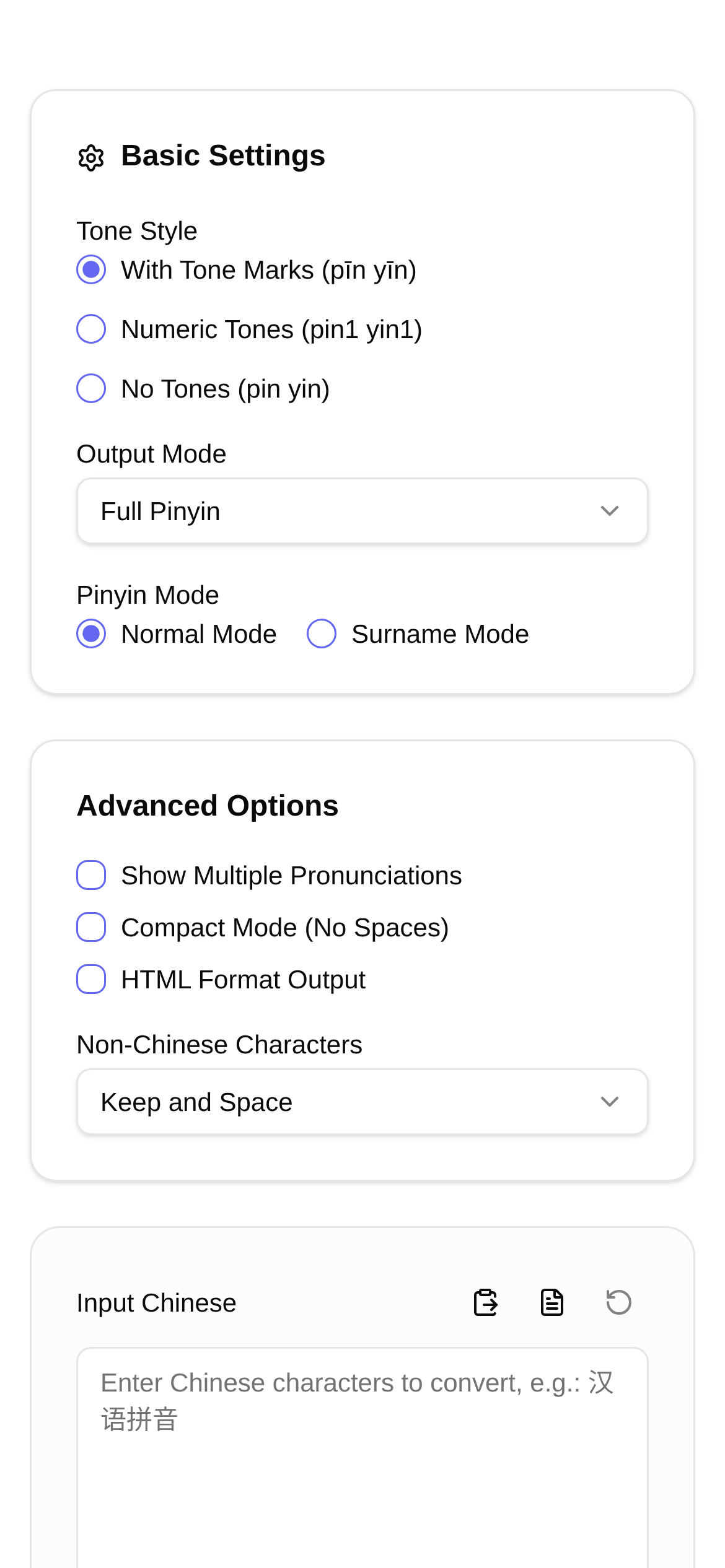
Working in digital media means dealing with text every single day, making a Chinese to Pinyin converter an absolute staple. But when it comes to tricky cases like polyphones (characters with multiple pronunciations) and Chinese names, accuracy becomes a major headache. Today, I want to talk about the Chinese to Pinyin conversion tools on the market and find out which one truly stands out.
Don't Think It Just Converts Pinyin—It Can Do So Much More!
A great Chinese to Pinyin converter isn't just about basic character-to-pinyin translation. It needs to be smart enough to handle complex text scenarios. Here are the key features I look for:
The most basic requirement, of course, is accurately converting Chinese characters into Pinyin with tone marks or tone numbers. But that's just the starting point.
Where a tool really proves its worth is in "polyphone recognition." For example, the character "行" is pronounced háng in "银行" (bank) but xíng in "行走" (walk). Whether the tool can distinguish the context and provide the correct Pinyin is absolutely crucial.
Then there's "Name Mode," a feature tailor-made for Chinese names. Chinese names are full of polyphones and special pronunciations. For instance, is "张行" pronounced zhāng xíng or zhāng háng? With Name Mode, you can avoid these awkward mistakes and ensure the Pinyin matches natural speaking habits.
Finally, there are various output styles. Pinyin with tone marks (like hǎo), tone numbers (hao3), first letters only (h), or toneless (hao)... Offering multiple options saves us the hassle of manual editing, which is incredibly convenient.
Who Actually Uses This Tool?
So, who exactly uses this kind of tool, and in what scenarios?
- Digital Media Operators: Creating Pinyin flashcards, learning materials, or adding phonetic notation to rare characters in articles makes content easier to understand and improves the reader experience.
- Teachers: It's a lifesaver when creating teaching slides, helping students learn Chinese character pronunciation, especially for easily confused polyphones.
- Teaching Chinese as a Second Language (TCSL) Instructors: Providing foreign students with accurate Chinese-to-Pinyin references to help them practice pronunciation.
- Writers / Editors: Proofreading Pinyin in manuscripts to ensure there are no errors is a fundamental skill.
- Developers: Building Chinese input methods, speech recognition software, or other text-processing applications often requires Chinese Pinyin data.
- Everyday Users: Quickly looking up the Pinyin for an unfamiliar character or adding Pinyin to your own name is super handy.
How to Use It? Taking Chinese to Pinyin Converter as an Example
Today, I want to recommend a comprehensive and easy-to-use online tool: the Chinese to Pinyin Converter. Not only does it support multiple Pinyin styles, but it also excels in polyphone and name modes.
First, open your browser and enter this URL: https://www.toolkk.com/tools/pinyin-chinese-converter.
Next, paste the Chinese characters you want to convert into the large text box on the left. It can handle phrases, sentences, or even entire paragraphs.
Then, select your mode:
- Polyphone Mode: Check the "Polyphone" option, and it will determine the correct pronunciation based on context. For example, if you input "长沙银行" (Bank of Changsha), the character "行" will be converted to
háng. - Name Mode: If you are inputting a name, like "单于" (surname "单"), checking "Name Mode" prioritizes name-specific pronunciations, converting "单" to
shàn.
After that, choose your preferred Pinyin style. Depending on your needs, select tone marks, tone numbers, first letters, or toneless Pinyin.
Finally, click the "Convert" button, and the generated Pinyin will instantly appear on the right. You can copy it directly for hassle-free use.
This Chinese to Pinyin Converter is incredibly intuitive; even first-time users can pick it up instantly. The interface is clean and straightforward, so you won't even need to look up a "how to use a Pinyin converter" tutorial.
Frequently Asked Questions
-
What is the difference between "Polyphone Mode" and "Name Mode"? Polyphone Mode primarily resolves characters that have different pronunciations in different words, such as "行" (háng) vs. "行" (xíng). Name Mode focuses specifically on the unique pronunciations of surnames or given names. For example, the surname "单" is usually pronounced
shànin names, rather thandān. -
What if the conversion is inaccurate? While modern Pinyin conversion tools—including the Chinese to Pinyin Converter I recommend—have very high accuracy rates, minor errors can still occur with extremely rare words or text lacking context. In such cases, a quick manual check and correction will do the trick.
-
Can I convert text in bulk? Most online tools support converting relatively long texts. However, if you need to process massive files or perform complex batch operations, you might want to consider desktop software or API integrations.
-
Who is this tool actually for? Simply put, from students to teachers, writers to digital marketers—if you need to convert Chinese characters to Pinyin, this tool is a massive help. It solves the feature gaps found in many older Pinyin converters, giving your workflow a serious efficiency boost.
My Final Thoughts
After using it for a while, I believe a great Chinese to Pinyin converter—like the Chinese to Pinyin Converter—goes far beyond simple character mapping. With intelligent polyphone recognition and Name Mode, it significantly improves conversion accuracy and practicality, making it an absolute must-have for daily work and study. Whether you're looking for a "Pinyin converter tutorial" or wondering "what to look out for in a Pinyin converter," this tool delivers excellent results. I highly recommend bookmarking it—you never know when you might need it!